What’s Hot

Showing posts with label windows phone. Show all posts


Microsoft has recently bagged a very important patent that could change the shape of the future smartphone industry. Right now, Microsoft is busy investing millions into its Windows Phone venture and is unable to produce appreciable profits despite the fact that Windows Phone devices possess a solid build quality. Microsoft is now the owner of the multi-OS booting patent. Smart and futuristic!
Now, let’s talk a bit more about it and the real meaning of this multi-booting patent. The usual theoretical notion of the simple multi-OS booting is dual-booting Android and Windows Phone on the same device. Earlier, we have read about a new software from Microsoft that was being developed and an Android Phone Xiaomi Mi4 was seen running on Windows 10. But, this patent is a lot more than that.
What is the meaning of multi-OS booting?

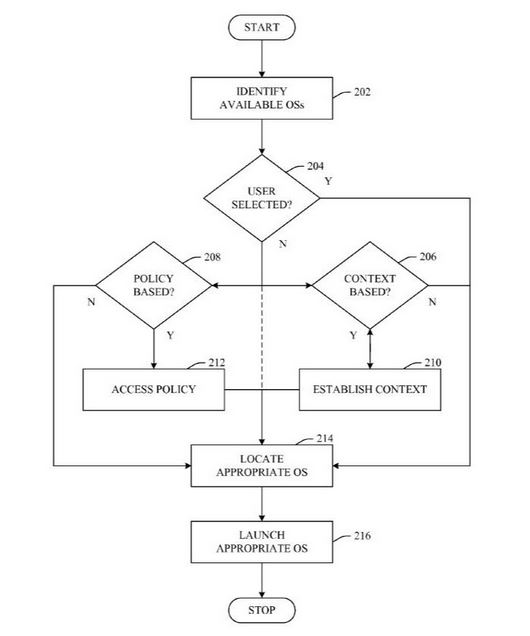
According to the United States Patent number 9,003,173, Microsoft has developed a new way to combine multiple operating systems on a mobile device to provide different functionalities. This patent will allow the user to select the OS necessary to perform a particular task, i.e. different tasks will be performed by different operating systems.
What are its advantages?

This multi-OS booting patent will give your phones a functionality to switch between different operating systems depending on the user needs (time, date, user etc.). The parts of the operating systems that need not to be stored on the device, can be accessed via cloud or downloaded from the web.

Also, this will give the user a new limited functionality option: suppose your phone is switched off and instead of booting it completely, you want to dial some emergency number or load just the camera function. Thus, the device will boot just a part of an OS as per the user needs.
What could be Microsoft’s future plans? 


Microsoft could use this multi-OS booting patent to run Android apps on Windows Phone devices. This could be developed into a tool that would enable the developers involved in Android app development to make Windows Phone supported apps easily.


This technology also features the part-cloud booting option that could be the thing of future given the market trend that 2015 is the year of cloud.

Currently, this idea of multi-OS booting is in the nascent phase and it’s a long way from the actual implementation. But, this surely is something impressive and futuristic from the Microsoft labs in Redmond.

Did this idea of dual-OS booting intrigue you? Tell us in comments!


Source:-fossbytes.com

android and windows in one phone | Microsoft Patents Multi-OS Booting


Microsoft has recently bagged a very important patent that could change the shape of the future smartphone industry. Right now, Microsoft is busy investing millions into its Windows Phone venture and is unable to produce appreciable profits despite the fact that Windows Phone devices possess a solid build quality. Microsoft is now the owner of the multi-OS booting patent. Smart and futuristic!
Now, let’s talk a bit more about it and the real meaning of this multi-booting patent. The usual theoretical notion of the simple multi-OS booting is dual-booting Android and Windows Phone on the same device. Earlier, we have read about a new software from Microsoft that was being developed and an Android Phone Xiaomi Mi4 was seen running on Windows 10. But, this patent is a lot more than that.
What is the meaning of multi-OS booting?

According to the United States Patent number 9,003,173, Microsoft has developed a new way to combine multiple operating systems on a mobile device to provide different functionalities. This patent will allow the user to select the OS necessary to perform a particular task, i.e. different tasks will be performed by different operating systems.

What are its advantages?

This multi-OS booting patent will give your phones a functionality to switch between different operating systems depending on the user needs (time, date, user etc.). The parts of the operating systems that need not to be stored on the device, can be accessed via cloud or downloaded from the web.

Also, this will give the user a new limited functionality option: suppose your phone is switched off and instead of booting it completely, you want to dial some emergency number or load just the camera function. Thus, the device will boot just a part of an OS as per the user needs.
What could be Microsoft’s future plans? 


Microsoft could use this multi-OS booting patent to run Android apps on Windows Phone devices. This could be developed into a tool that would enable the developers involved in Android app development to make Windows Phone supported apps easily.


This technology also features the part-cloud booting option that could be the thing of future given the market trend that 2015 is the year of cloud.

Currently, this idea of multi-OS booting is in the nascent phase and it’s a long way from the actual implementation. But, this surely is something impressive and futuristic from the Microsoft labs in Redmond.

Did this idea of dual-OS booting intrigue you? Tell us in comments!


Source:-fossbytes.com


Microsoft desperately wants its Windows Phone 8 operating system to succeed. Unfortunately, when lining up against free, feature-rich competitors like Android, WP8 faces an uphill battle against manufacturers.
That’s why Microsoft is reportedly planning something totally new for smartphones: a dual-boot device that would allow users to choose to boot into either Android or Windows Phone OS. Apparently, Microsoft has entered negotiations with Taiwanese manufacturer HTC about making the device.
Microsoft Wants to Make Smartphones That Dual Boot to Android and WindowsIn an effort to make HTC sign up for the agreement, Microsoft cut its licensing fees for the company. However, HTC has so far refused to install Windows Phone OS on any of its products and it’s unknown whether or not this dual boot device has any chance of ever being released. At the same time, Windows Phone is facing weak sales around the world and a market share of just 3.7%.
What’s in it for HTC?
Dual Boot to Android and Windows
A dual boot smartphone would be an interesting experiment. As HTC tries to decide whether or not to accept Microsoft’s offer, they have to think what’s in it for users.
What are the advantages of a dual boot operating system?
-Windows Phone users would be able to access Android-exclusive apps and features, while Android users would be able to do the same with Windows Phone exclusive features
-If you don’t like one UI, you could switch to the other
-People who use Outlook and Google Drive or Gmail and Skydrive (or any other Microsoft service and Google service simultaneously) would probably be happy
-????????
A dual boot smartphone would also come with some noticeable disadvantages. Smartphone internal storage units are already crowded with just one OS installed; a dual boot smartphone would have to have a larger internal storage unit just to give users a few gigabytes of usable space.
Of course, the biggest issue is that smartphone users don’t like Windows Phone OS. Android has market shares above 50% around the world, while Microsoft’s Windows Phone is in a distant third place at less than 5% nearly everywhere you look (except Nokia’s homeland of Finland).
At this point, the only reason Windows Phone 8 still has any market share is because Nokia signed an agreement to exclusively make Windows Phones – a decision which has likely had a negative impact on the company. Once that agreement runs out, Windows Phone OS could become a thing of the past.
That is, of course, unless Microsoft convinces other manufacturers to actually start making Windows Phones.

Source:- oneclickroot


Microsoft Wants to Make Smartphones That Dual Boot to Android and Windows


Microsoft desperately wants its Windows Phone 8 operating system to succeed. Unfortunately, when lining up against free, feature-rich competitors like Android, WP8 faces an uphill battle against manufacturers.
That’s why Microsoft is reportedly planning something totally new for smartphones: a dual-boot device that would allow users to choose to boot into either Android or Windows Phone OS. Apparently, Microsoft has entered negotiations with Taiwanese manufacturer HTC about making the device.
Microsoft Wants to Make Smartphones That Dual Boot to Android and WindowsIn an effort to make HTC sign up for the agreement, Microsoft cut its licensing fees for the company. However, HTC has so far refused to install Windows Phone OS on any of its products and it’s unknown whether or not this dual boot device has any chance of ever being released. At the same time, Windows Phone is facing weak sales around the world and a market share of just 3.7%.
What’s in it for HTC?
Dual Boot to Android and Windows
A dual boot smartphone would be an interesting experiment. As HTC tries to decide whether or not to accept Microsoft’s offer, they have to think what’s in it for users.
What are the advantages of a dual boot operating system?
-Windows Phone users would be able to access Android-exclusive apps and features, while Android users would be able to do the same with Windows Phone exclusive features
-If you don’t like one UI, you could switch to the other
-People who use Outlook and Google Drive or Gmail and Skydrive (or any other Microsoft service and Google service simultaneously) would probably be happy
-????????
A dual boot smartphone would also come with some noticeable disadvantages. Smartphone internal storage units are already crowded with just one OS installed; a dual boot smartphone would have to have a larger internal storage unit just to give users a few gigabytes of usable space.
Of course, the biggest issue is that smartphone users don’t like Windows Phone OS. Android has market shares above 50% around the world, while Microsoft’s Windows Phone is in a distant third place at less than 5% nearly everywhere you look (except Nokia’s homeland of Finland).
At this point, the only reason Windows Phone 8 still has any market share is because Nokia signed an agreement to exclusively make Windows Phones – a decision which has likely had a negative impact on the company. Once that agreement runs out, Windows Phone OS could become a thing of the past.
That is, of course, unless Microsoft convinces other manufacturers to actually start making Windows Phones.

Source:- oneclickroot


Windows 10 Technical Preview for phones is now available to download. This is a pre-release version of Microsoft's upcoming mobile operating system. You should only download this if you want to try a new operating system on your Windows Phone device. Since this is beta software, many of your favourite apps may not work on it and upgrading to it right now is not recommended on your primary phone as the preview is still very much a work in progress.
If you have a spare Windows Phone device lying around or if you love playing around with latest (potentially buggy) builds of operating systems, then read on.
Supported devices
Currently, Microsoft says only six Lumia phones can download and install Windows 10 Technical Preview for phones. These are:
  • Lumia 630
  • Lumia 635
  • Lumia 636
  • Lumia 638
  • Lumia 730
  • Lumia 830
More phones will be supported in future builds, but for now only users of the phones listed above can try Windows 10 Technical Preview.
Backing up your data
This is beta software and hence can be very buggy. That's why we recommend that you make a complete backup of your Windows Phone first. We have written a detailed guide on how to backup and delete all data on your Windows Phone device and you must go follow all the steps listed there before proceeding.

Downloading and installing Windows 10 Technical Preview for phones
The process for downloading Windows 10 Technical Preview for phones is not too hard, especially if you know how to download and install Windows 10 Technical Preview on your PC. Follow these steps.
  1. Head to the Windows Insider page.
  2. Click Get Started to sign up for the programme.
  3. Enter your Outlook.com email address and password.
  4. Click Sign in.
  5. Read the terms of service, scroll down and check I accept the terms of this agreement (required).
  6. Click Submit.
  7. Scroll down and click Phone.
  8. Scroll down and click Get the preview.
  9. Download the Windows Insider app on your Windows Phone device.
  10. Open the app and sign in using your Microsoft account.
  11. Tap Get preview builds.
  12. Here you'll have to choose between receiving OS updates as they're released or after some bugs have been fixed. Tap Insider Fast to stay on the bleeding edge or pick Insider Slow if you'd like a slightly more reliable build.
  13. Take a look at all the warnings and then tap Accept.
  14. Tap the Windows button on your phone.
  15. Go to Settings > Phone Update.
  16. Tap Check for updates.
lumia_830_microsoft.jpg
Now you'll be able to download the latest Windows 10 builds for your smartphone. Tell us about your experience with Windows 10 on mobile and PC via the comments. For more tutorials, visit our How To section.

How to Download and Install Windows 10 for Phones.


Windows 10 Technical Preview for phones is now available to download. This is a pre-release version of Microsoft's upcoming mobile operating system. You should only download this if you want to try a new operating system on your Windows Phone device. Since this is beta software, many of your favourite apps may not work on it and upgrading to it right now is not recommended on your primary phone as the preview is still very much a work in progress.
If you have a spare Windows Phone device lying around or if you love playing around with latest (potentially buggy) builds of operating systems, then read on.
Supported devices
Currently, Microsoft says only six Lumia phones can download and install Windows 10 Technical Preview for phones. These are:
  • Lumia 630
  • Lumia 635
  • Lumia 636
  • Lumia 638
  • Lumia 730
  • Lumia 830
More phones will be supported in future builds, but for now only users of the phones listed above can try Windows 10 Technical Preview.
Backing up your data
This is beta software and hence can be very buggy. That's why we recommend that you make a complete backup of your Windows Phone first. We have written a detailed guide on how to backup and delete all data on your Windows Phone device and you must go follow all the steps listed there before proceeding.

Downloading and installing Windows 10 Technical Preview for phones
The process for downloading Windows 10 Technical Preview for phones is not too hard, especially if you know how to download and install Windows 10 Technical Preview on your PC. Follow these steps.
  1. Head to the Windows Insider page.
  2. Click Get Started to sign up for the programme.
  3. Enter your Outlook.com email address and password.
  4. Click Sign in.
  5. Read the terms of service, scroll down and check I accept the terms of this agreement (required).
  6. Click Submit.
  7. Scroll down and click Phone.
  8. Scroll down and click Get the preview.
  9. Download the Windows Insider app on your Windows Phone device.
  10. Open the app and sign in using your Microsoft account.
  11. Tap Get preview builds.
  12. Here you'll have to choose between receiving OS updates as they're released or after some bugs have been fixed. Tap Insider Fast to stay on the bleeding edge or pick Insider Slow if you'd like a slightly more reliable build.
  13. Take a look at all the warnings and then tap Accept.
  14. Tap the Windows button on your phone.
  15. Go to Settings > Phone Update.
  16. Tap Check for updates.
lumia_830_microsoft.jpg
Now you'll be able to download the latest Windows 10 builds for your smartphone. Tell us about your experience with Windows 10 on mobile and PC via the comments. For more tutorials, visit our How To section.


lumia_830_microsoft.jpg
Windows 10 Technical Preview for phones is now available to download. This is a pre-release version of Microsoft's upcoming mobile operating system. You should only download this if you want to try a new operating system on your Windows Phone device. Since this is beta software, many of your favourite apps may not work on it and upgrading to it right now is not recommended on your primary phone as the preview is still very much a work in progress.

If you have a spare Windows Phone device lying around or if you love playing around with latest (potentially buggy) builds of operating systems, then read on.
Supported devices
Currently, Microsoft says only six Lumia phones can download and install Windows 10 Technical Preview for phones. These are:
  • Lumia 630
  • Lumia 635
  • Lumia 636
  • Lumia 638
  • Lumia 730
  • Lumia 830
More phones will be supported in future builds, but for now only users of the phones listed above can try Windows 10 Technical Preview.
Backing up your data
This is beta software and hence can be very buggy. That's why we recommend that you make a complete backup of your Windows Phone first. We have written a detailed guide on how to backup and delete all data on your Windows Phone device and you must go follow all the steps listed there before proceeding.

Downloading and installing Windows 10 Technical Preview for phones
The process for downloading Windows 10 Technical Preview for phones is not too hard, especially if you know how to download and install Windows 10 Technical Preview on your PC. Follow these steps.

  1. Head to the Windows Insider page.
  2. Click Get Started to sign up for the programme.
  3. Enter your Outlook.com email address and password.
  4. Click Sign in.
  5. Read the terms of service, scroll down and check I accept the terms of this agreement (required).
  6. Click Submit.
  7. Scroll down and click Phone.
  8. Scroll down and click Get the preview.
  9. Download the Windows Insider app on your Windows Phone device.
  10. Open the app and sign in using your Microsoft account.
  11. Tap Get preview builds.
  12. Here you'll have to choose between receiving OS updates as they're released or after some bugs have been fixed. Tap Insider Fast to stay on the bleeding edge or pick Insider Slow if you'd like a slightly more reliable build.
  13. Take a look at all the warnings and then tap Accept.
Tap the Windows button on your phone.
  1. Go to Settings > Phone Update.
  2. Tap Check for updates.
Now you'll be able to download the latest Windows 10 builds for your smartphone. Tell us about your experience with Windows 10 on mobile and PC via the comments. For more tutorials, visit our How To section.

How to Install Windows 10 Technical Preview for Windows Phones.

lumia_830_microsoft.jpg
Windows 10 Technical Preview for phones is now available to download. This is a pre-release version of Microsoft's upcoming mobile operating system. You should only download this if you want to try a new operating system on your Windows Phone device. Since this is beta software, many of your favourite apps may not work on it and upgrading to it right now is not recommended on your primary phone as the preview is still very much a work in progress.

If you have a spare Windows Phone device lying around or if you love playing around with latest (potentially buggy) builds of operating systems, then read on.
Supported devices
Currently, Microsoft says only six Lumia phones can download and install Windows 10 Technical Preview for phones. These are:
  • Lumia 630
  • Lumia 635
  • Lumia 636
  • Lumia 638
  • Lumia 730
  • Lumia 830
More phones will be supported in future builds, but for now only users of the phones listed above can try Windows 10 Technical Preview.
Backing up your data
This is beta software and hence can be very buggy. That's why we recommend that you make a complete backup of your Windows Phone first. We have written a detailed guide on how to backup and delete all data on your Windows Phone device and you must go follow all the steps listed there before proceeding.

Downloading and installing Windows 10 Technical Preview for phones
The process for downloading Windows 10 Technical Preview for phones is not too hard, especially if you know how to download and install Windows 10 Technical Preview on your PC. Follow these steps.

  1. Head to the Windows Insider page.
  2. Click Get Started to sign up for the programme.
  3. Enter your Outlook.com email address and password.
  4. Click Sign in.
  5. Read the terms of service, scroll down and check I accept the terms of this agreement (required).
  6. Click Submit.
  7. Scroll down and click Phone.
  8. Scroll down and click Get the preview.
  9. Download the Windows Insider app on your Windows Phone device.
  10. Open the app and sign in using your Microsoft account.
  11. Tap Get preview builds.
  12. Here you'll have to choose between receiving OS updates as they're released or after some bugs have been fixed. Tap Insider Fast to stay on the bleeding edge or pick Insider Slow if you'd like a slightly more reliable build.
  13. Take a look at all the warnings and then tap Accept.
Tap the Windows button on your phone.
  1. Go to Settings > Phone Update.
  2. Tap Check for updates.
Now you'll be able to download the latest Windows 10 builds for your smartphone. Tell us about your experience with Windows 10 on mobile and PC via the comments. For more tutorials, visit our How To section.


Lumia Denim Update Is Now Available For Lumia 830:-
The Lumia denim firmware update is once again expanding its reach to more Lumia devices in India. The denim firmware is now rollout to Lumia 830 smartphones in India. So if you have Lumia 830, you can now check for the update.
What this update brings to your device:
•Live Folders for a more personal Start screen
•"Hey Cortana" feature (Currently Only for Lumia 1520 & 930)
• Lumia Camera 5.0- For owners of the Lumia 930, 1520 and 830, your camera features just got even better
•An optimised glance screen
And many others new features.
The Lumia Denim is now available to many Lumia devices in India. 

Here's the list :
• Lumia 520
• Lumia 525
• Lumia 530
• Lumia 535
• Lumia 620
• Lumia 720
• Lumia 820
• Lumia 830
• Lumia 920 & 925
• Lumia 930
• Lumia 1020
• Lumia 1520
If your device is not listed above, don't worry you will get it soon.


Source:- windowscentral.com & Microsoft website

Lumia Denim Update Is Now Available In India.

Lumia Denim Update Is Now Available For Lumia 830:-
The Lumia denim firmware update is once again expanding its reach to more Lumia devices in India. The denim firmware is now rollout to Lumia 830 smartphones in India. So if you have Lumia 830, you can now check for the update.
What this update brings to your device:
•Live Folders for a more personal Start screen
•"Hey Cortana" feature (Currently Only for Lumia 1520 & 930)
• Lumia Camera 5.0- For owners of the Lumia 930, 1520 and 830, your camera features just got even better
•An optimised glance screen
And many others new features.
The Lumia Denim is now available to many Lumia devices in India. 

Here's the list :
• Lumia 520
• Lumia 525
• Lumia 530
• Lumia 535
• Lumia 620
• Lumia 720
• Lumia 820
• Lumia 830
• Lumia 920 & 925
• Lumia 930
• Lumia 1020
• Lumia 1520
If your device is not listed above, don't worry you will get it soon.


Source:- windowscentral.com & Microsoft website