What’s Hot

Showing posts with label Kali Linux. Show all posts

Intro - In this tutorial we will learn How to use armitage for hacking windows XP as well as we will learn using of Meterpreter. I will Explain you simple and easiest way to run armitage in Kali Linux. I noticed one thing while starting armitage by going Application → kali linux → Exploitation Tools → Network Exploitation → armitage . There i got an error "Could not connect to database." If you are using first time Armitage on Kali linux then there are two way to run successfully armitage on your system. I will explain both separately.

A. How to open armitage. 
      1. Go to application → System Service → Metasploit → community/pro start


      2. Type armitage and hit enter

B. How to open armitage
     1. Open terminal and type service postgresql start

     2. again type in terminal service metasploit start

     3. now type armitage

After one of above method follow these
4. after some time you will see this screen just click on connect 

5. In next screen click on Yes

6. now armitage is connecting to database it takes little bit time 

7. Your armitage has been successfully opened more explaination on image 

8. Now be ready to start your work Here we are going Host Nmap scan Quick scan (OS Detect)

9. Here we need to write a range of victim IP address I am putting C grade range of IP so armitage will detect victim IP. This scan will be more easy if you know the victim IP address. There are many way to know the victim IP address we will discuss about it later.  

10.  Scan completed just click ok 

11. Here we can see. Armitage found two victim. Here we will discuss about 192.168.75.131
Now we are going to Attacks Find Attacks

12. Find attack scan completed click on ok 

13. Now right click on victim pc go to Attack smb ms08_067_netapi

14. check “use a reverse connection” and click on launch 

15. Here we can see 192.168.75.131 is rounded by red color. It means we have successfully caught Victim PC.

16. Now we are starting meterpreter. This is the 1st action which we can do with victim pc. Right click on victim 192.168.75.131 go to Meterpreter → Interact→ Command Shell

17. Here we are enter on Victim PC command. I will not explain more things about cmd as you know in cmd we can see all the directory and files, we can delete, remove, create files or folder , we can format drive etc…

18. 2nd action with Meterpreter. Goto Meterpreter → Explore → Browse Files

19. Here we are enter in victim explorer. We can upload a file or virus or backdoor. Use your mind and do whatever you want to do with your victim…

20. 3rd action with Meterpreter. Go to Meterpreter → Explore → Screenshot

21. when you click on screenshot (above image). You will see a screenshot of your victim pc. Through this you can get lot of information like what your victim is doing right now on his PC etc..

22. 4th action with Meterpreter. Go to Meterpreter → Explore → Log Keystrokes

23. click on launch

24. This is my Windows XP PC which I am using as victim PC. Here I am typing “I am victim” to show you how Log keystrokes work .

25. Here you can see here I got keystroke of my victim pc that is “I am victim”

26.  5th action with meterpreter. Go to Meterpreter Explore Show Processes

27. This is victim pc. he has opened notepad.

28. Here we are killing victim notepad. First of all select notepad extention then click on kill. By using this you can kill all programs which are running on victim pc etc…
if you like my tutorials please comment


Show-geeky show

How to Hack Windows XP Using Armitage Kali Linux


Intro - In this tutorial we will learn How to use armitage for hacking windows XP as well as we will learn using of Meterpreter. I will Explain you simple and easiest way to run armitage in Kali Linux. I noticed one thing while starting armitage by going Application → kali linux → Exploitation Tools → Network Exploitation → armitage . There i got an error "Could not connect to database." If you are using first time Armitage on Kali linux then there are two way to run successfully armitage on your system. I will explain both separately.

A. How to open armitage. 
      1. Go to application → System Service → Metasploit → community/pro start


      2. Type armitage and hit enter

B. How to open armitage
     1. Open terminal and type service postgresql start

     2. again type in terminal service metasploit start

     3. now type armitage

After one of above method follow these
4. after some time you will see this screen just click on connect 

5. In next screen click on Yes

6. now armitage is connecting to database it takes little bit time 

7. Your armitage has been successfully opened more explaination on image 

8. Now be ready to start your work Here we are going Host Nmap scan Quick scan (OS Detect)

9. Here we need to write a range of victim IP address I am putting C grade range of IP so armitage will detect victim IP. This scan will be more easy if you know the victim IP address. There are many way to know the victim IP address we will discuss about it later.  

10.  Scan completed just click ok 

11. Here we can see. Armitage found two victim. Here we will discuss about 192.168.75.131
Now we are going to Attacks Find Attacks

12. Find attack scan completed click on ok 

13. Now right click on victim pc go to Attack smb ms08_067_netapi

14. check “use a reverse connection” and click on launch 

15. Here we can see 192.168.75.131 is rounded by red color. It means we have successfully caught Victim PC.

16. Now we are starting meterpreter. This is the 1st action which we can do with victim pc. Right click on victim 192.168.75.131 go to Meterpreter → Interact→ Command Shell

17. Here we are enter on Victim PC command. I will not explain more things about cmd as you know in cmd we can see all the directory and files, we can delete, remove, create files or folder , we can format drive etc…

18. 2nd action with Meterpreter. Goto Meterpreter → Explore → Browse Files

19. Here we are enter in victim explorer. We can upload a file or virus or backdoor. Use your mind and do whatever you want to do with your victim…

20. 3rd action with Meterpreter. Go to Meterpreter → Explore → Screenshot

21. when you click on screenshot (above image). You will see a screenshot of your victim pc. Through this you can get lot of information like what your victim is doing right now on his PC etc..

22. 4th action with Meterpreter. Go to Meterpreter → Explore → Log Keystrokes

23. click on launch

24. This is my Windows XP PC which I am using as victim PC. Here I am typing “I am victim” to show you how Log keystrokes work .

25. Here you can see here I got keystroke of my victim pc that is “I am victim”

26.  5th action with meterpreter. Go to Meterpreter Explore Show Processes

27. This is victim pc. he has opened notepad.

28. Here we are killing victim notepad. First of all select notepad extention then click on kill. By using this you can kill all programs which are running on victim pc etc…
if you like my tutorials please comment

Show-geeky show


ShutterstockIn the world of web where we get the global connectivity, it is far easier to break into someone’s personal zone. By personal, we do not just mean the social media. The world wide web which has become the hub of storing and restoring information, considered to be the safest vault, is a mere toy in the hands of a few computer geniuses. Hackers, Black Hat Hackers, villains, crackers, cyber-criminals, cyber pirates as they are well-known, throw a malicious software or virus at a system to gain the access to the desired information. Piqued by curiosity, they may perhaps break into your system too. Here are top 10 hackers or the whiz kids who put the world in awe with their dexterity.

1. Gary McKinnon


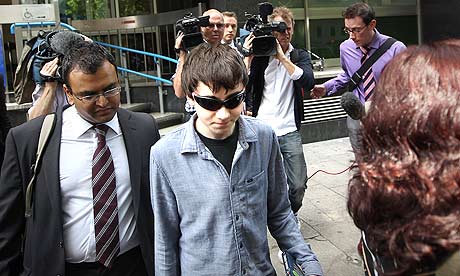
Gary McKinnon must’ve been a curious, restless child, for to gain information on UFOs, he thought it better to get a direct access into the channels of NASA. He infiltrated 97 US military and NASA computers, by installing virus and deleting a few files. All the efforts to satisfy his curiosity, but, alas, curiosity killed the cat. It was soon found that McKinnon was guilty of having hacked the military and NASA websites from his girlfriend’s aunt’s house in London. While entering and deleting the files from these websites wasn’t enough, McKinnon thought of shaming the security forces by putting out a notice on the website that said, “Your security is crap.” Well, looks like McKinnon was something, if he could shut down the US Military’s Washington Network of about 2000 computers for 24 hours, making the hack, the biggest military computer hack of all time!

2. LulzSec

LulzSec or Lulz Security, a high profile, Black Hat hacker group, gained credentials for hacking into Sony, News International, CIA, FBI, Scotland Yard, and several noteworthy accounts. So notorious was the group that when it hacked into News Corporations account, they put across a false report of Rupert Murdoch having passed away. While the group claims to have retired from their vile duties, the motto of the group, “Laughing at your security since 2011!” stays alive. There are assertions of the group having hacked into the websites of the newspapers like The Times and The Sun to post its retirement news. Many, however, claim that this group had taken it upon itself to create awareness about the absence of efficient security against hackers.

3. Adrian Lamo

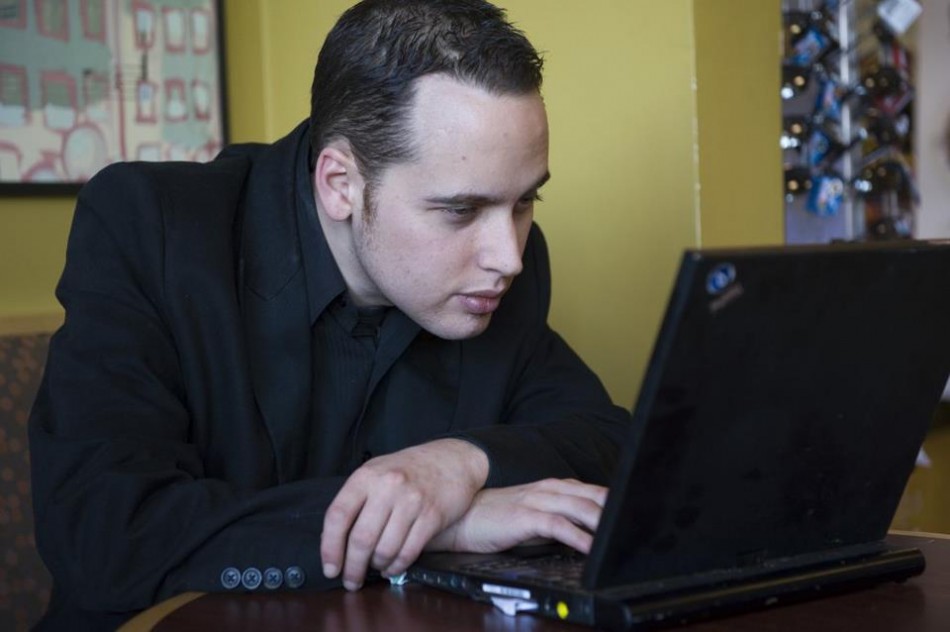
Adrian Lamo decided to switch careers when he realized the potentials of his skills. He became a news when he hacked into Yahoo!, Microsoft, Google, and The New York Times. This, although culminated into his arrest, it later helped him gain the batch of an American Threat Analyst. A guy who would hack into top-notch accounts sitting in the spacious and comforting cafeterias, libraries, internet cafes, soon turned Wikileaks suspect Bradley Manning over to FBI. While Manning was arrested for leaking several hundred sensitive US government documents, Lamo went hiding or should we presume, undercover?

4. Mathew Bevan and Richard Pryce


Targeting the over-sensitive nerves, what Mathew Bevan along with his alleged partner Richard Pryce did, could have triggered great many issues between USA and North Korea. The duo hacked the US military computers and used it as a means to infiltrate the foreign systems. The crucial contents of Korean Atomic Research Institute were dumped into USAF system. However, the contents were majorly relevant to South Korea and hence, less volatile. But this, nonetheless, could have led to a huge international issue.

5. Jonathan James

The first juvenile to be imprisoned for a cyber-crime at the age of 16, Jonathan James or better known as c0mrade, hacked into Defense Threat Reduction Agency of US department. Further, he installed a sniffer that scrutinized the messages passed on between the DTRA employees. Not only did he keep a check on the messages being passed around, in the process, he collected the passwords and usernames and other such vital details of the employees, and further even stole essential software. All this cost NASA to shut down its system and to pay from its pocket $41,000. c0mrade, however, had a bitter ending as James committed suicide in 2008.

6. Kevin Poulsen

How far would you go to win your dream car or a dream house? How far will you go to win an online contest or a radio show contest? Perhaps, you shall keep trying your luck, unless you are Kevin Poulsen! Poulsen infiltrated a radio shows call-in contest just so he could win a Porsche. Dark Dante, as he was better known, went underground after FBI started pursuing him. He, later, was found guilty of seven counts of mail, wire and computer fraud, money laundering and the likes. What turned out to be rewarding in Dark Dante’s case is – his past crafted his future. Poulsen now serves as a Senior Editor at Wired.

7. Kevin Mitnick

Clad in an Armani suit, when a bespectacled face in his mid-40s smiles at you from the computer screen, you can hardly consider the man a cyber-criminal. Such is the case with Kevin David Mitnick. Once upon a time, the most wanted cyber-criminal of US, now is an affluent entrepreneur. Kevin, who is now a security consultant, was convicted of hacking Nokia, Motorola and Pentagon. He pleaded guilty to seven counts of fraud that included wire fraud, computer fraud and of illegally interception a wire communication. After five years of incarceration that included eight months of solitary confinement, Mitnick now has started afresh. However, his knack with the computers is still reminisced and was even depicted on celluloid in the films Takedown and Freedom Downtown.


8. Anonymous


The concept of being a “digital Robin Hood” was far from being conceived, but in the computer age, it is very likely that someone somewhere has bagged this title. A “hacktivist group” called Anonymous are known with the penname of being the “digital Robin Hood” amongst its supporters. Identified in public by wearing a Guy Fawkes Masks, Anons, as they are widely known, have publicized themselves by attacking the government, religious and corporate websites. The Vatican, the FBI, the CIA, PayPal, Sony, Mastercard, Visa, Chinese, Israeli, Tunisian, and Ugandan governments have been amongst their targets. Although, Anons have been arguing whether to engage in a serious activism or a mere entertainment, many of the group members have clarified their intent which is to attack internet censorship and control.

9. Astra

Astra, a Sanskrit word for weapon was the penname of a hacker who dealt in the weapon stealing and selling. A 58-year-old Greek Mathematician hacked into the systems of France’s Dassault Group, stole vulnerable weapons technology data and sold it to different countries for five long years. While the real identity of the ASTRA remains untraced, officials have said that he had been wanted since 2002. Astra sold the data to approximately 250 people from around the globe, which cost Dassault $360 millions of damage.

10. Albert Gonzalez


How safe is internet banking? When we browse through the profile of this mastermind, we are certain that one ought to use the World Wide Web with immense care. For two long years, Albert Gonzalez, stole from credit cards of the netizens. This was recorded to be the biggest credit card theft in the history of mankind. He resold approximately 170 million credit cards and ATM numbers. He did so by installing a sniffer and sniffing out the computer data from internal corporate networks. When arrested, Gonzalez was sentenced to 20 years in Federal prison.

10 Best Hackers The World Has Ever Known


ShutterstockIn the world of web where we get the global connectivity, it is far easier to break into someone’s personal zone. By personal, we do not just mean the social media. The world wide web which has become the hub of storing and restoring information, considered to be the safest vault, is a mere toy in the hands of a few computer geniuses. Hackers, Black Hat Hackers, villains, crackers, cyber-criminals, cyber pirates as they are well-known, throw a malicious software or virus at a system to gain the access to the desired information. Piqued by curiosity, they may perhaps break into your system too. Here are top 10 hackers or the whiz kids who put the world in awe with their dexterity.

1. Gary McKinnon


Gary McKinnon must’ve been a curious, restless child, for to gain information on UFOs, he thought it better to get a direct access into the channels of NASA. He infiltrated 97 US military and NASA computers, by installing virus and deleting a few files. All the efforts to satisfy his curiosity, but, alas, curiosity killed the cat. It was soon found that McKinnon was guilty of having hacked the military and NASA websites from his girlfriend’s aunt’s house in London. While entering and deleting the files from these websites wasn’t enough, McKinnon thought of shaming the security forces by putting out a notice on the website that said, “Your security is crap.” Well, looks like McKinnon was something, if he could shut down the US Military’s Washington Network of about 2000 computers for 24 hours, making the hack, the biggest military computer hack of all time!

2. LulzSec

LulzSec or Lulz Security, a high profile, Black Hat hacker group, gained credentials for hacking into Sony, News International, CIA, FBI, Scotland Yard, and several noteworthy accounts. So notorious was the group that when it hacked into News Corporations account, they put across a false report of Rupert Murdoch having passed away. While the group claims to have retired from their vile duties, the motto of the group, “Laughing at your security since 2011!” stays alive. There are assertions of the group having hacked into the websites of the newspapers like The Times and The Sun to post its retirement news. Many, however, claim that this group had taken it upon itself to create awareness about the absence of efficient security against hackers.

3. Adrian Lamo

Adrian Lamo decided to switch careers when he realized the potentials of his skills. He became a news when he hacked into Yahoo!, Microsoft, Google, and The New York Times. This, although culminated into his arrest, it later helped him gain the batch of an American Threat Analyst. A guy who would hack into top-notch accounts sitting in the spacious and comforting cafeterias, libraries, internet cafes, soon turned Wikileaks suspect Bradley Manning over to FBI. While Manning was arrested for leaking several hundred sensitive US government documents, Lamo went hiding or should we presume, undercover?

4. Mathew Bevan and Richard Pryce


Targeting the over-sensitive nerves, what Mathew Bevan along with his alleged partner Richard Pryce did, could have triggered great many issues between USA and North Korea. The duo hacked the US military computers and used it as a means to infiltrate the foreign systems. The crucial contents of Korean Atomic Research Institute were dumped into USAF system. However, the contents were majorly relevant to South Korea and hence, less volatile. But this, nonetheless, could have led to a huge international issue.

5. Jonathan James

The first juvenile to be imprisoned for a cyber-crime at the age of 16, Jonathan James or better known as c0mrade, hacked into Defense Threat Reduction Agency of US department. Further, he installed a sniffer that scrutinized the messages passed on between the DTRA employees. Not only did he keep a check on the messages being passed around, in the process, he collected the passwords and usernames and other such vital details of the employees, and further even stole essential software. All this cost NASA to shut down its system and to pay from its pocket $41,000. c0mrade, however, had a bitter ending as James committed suicide in 2008.

6. Kevin Poulsen

How far would you go to win your dream car or a dream house? How far will you go to win an online contest or a radio show contest? Perhaps, you shall keep trying your luck, unless you are Kevin Poulsen! Poulsen infiltrated a radio shows call-in contest just so he could win a Porsche. Dark Dante, as he was better known, went underground after FBI started pursuing him. He, later, was found guilty of seven counts of mail, wire and computer fraud, money laundering and the likes. What turned out to be rewarding in Dark Dante’s case is – his past crafted his future. Poulsen now serves as a Senior Editor at Wired.

7. Kevin Mitnick

Clad in an Armani suit, when a bespectacled face in his mid-40s smiles at you from the computer screen, you can hardly consider the man a cyber-criminal. Such is the case with Kevin David Mitnick. Once upon a time, the most wanted cyber-criminal of US, now is an affluent entrepreneur. Kevin, who is now a security consultant, was convicted of hacking Nokia, Motorola and Pentagon. He pleaded guilty to seven counts of fraud that included wire fraud, computer fraud and of illegally interception a wire communication. After five years of incarceration that included eight months of solitary confinement, Mitnick now has started afresh. However, his knack with the computers is still reminisced and was even depicted on celluloid in the films Takedown and Freedom Downtown.


8. Anonymous


The concept of being a “digital Robin Hood” was far from being conceived, but in the computer age, it is very likely that someone somewhere has bagged this title. A “hacktivist group” called Anonymous are known with the penname of being the “digital Robin Hood” amongst its supporters. Identified in public by wearing a Guy Fawkes Masks, Anons, as they are widely known, have publicized themselves by attacking the government, religious and corporate websites. The Vatican, the FBI, the CIA, PayPal, Sony, Mastercard, Visa, Chinese, Israeli, Tunisian, and Ugandan governments have been amongst their targets. Although, Anons have been arguing whether to engage in a serious activism or a mere entertainment, many of the group members have clarified their intent which is to attack internet censorship and control.

9. Astra

Astra, a Sanskrit word for weapon was the penname of a hacker who dealt in the weapon stealing and selling. A 58-year-old Greek Mathematician hacked into the systems of France’s Dassault Group, stole vulnerable weapons technology data and sold it to different countries for five long years. While the real identity of the ASTRA remains untraced, officials have said that he had been wanted since 2002. Astra sold the data to approximately 250 people from around the globe, which cost Dassault $360 millions of damage.

10. Albert Gonzalez


How safe is internet banking? When we browse through the profile of this mastermind, we are certain that one ought to use the World Wide Web with immense care. For two long years, Albert Gonzalez, stole from credit cards of the netizens. This was recorded to be the biggest credit card theft in the history of mankind. He resold approximately 170 million credit cards and ATM numbers. He did so by installing a sniffer and sniffing out the computer data from internal corporate networks. When arrested, Gonzalez was sentenced to 20 years in Federal prison.


A number of you have written me regarding which operating system is best for hacking. I'll start by saying that nearly every professional and expert hacker uses Linux or Unix. Although some hacks can be done with Windows and Mac OS, nearly all of the hacking tools are developed specifically for Linux.


There are some exceptions, though, including software like Cain and Abel, Havij, Zenmap, and Metasploit that are developed or ported for Windows.
When these Linux apps are developed in Linux and then ported over to Windows, they often lose some of their capabilities. In addition, there are capabilities built into Linux that simply are not available in Windows. That is why hacker tools are in most cases ONLY developed for Linux.
To summarize, to be a real expert hacker, you should master a few Linux skills and work from a Linux distribution like BackTrack or Kali.
Image via wonderhowto.com
For those of you who've never used Linux, I dedicate the next few tutorials on the basics of Linux with an emphasis on the skills you need for hacking. So, let's open up BackTrack or your other Linux distribution and let me show you a few things.

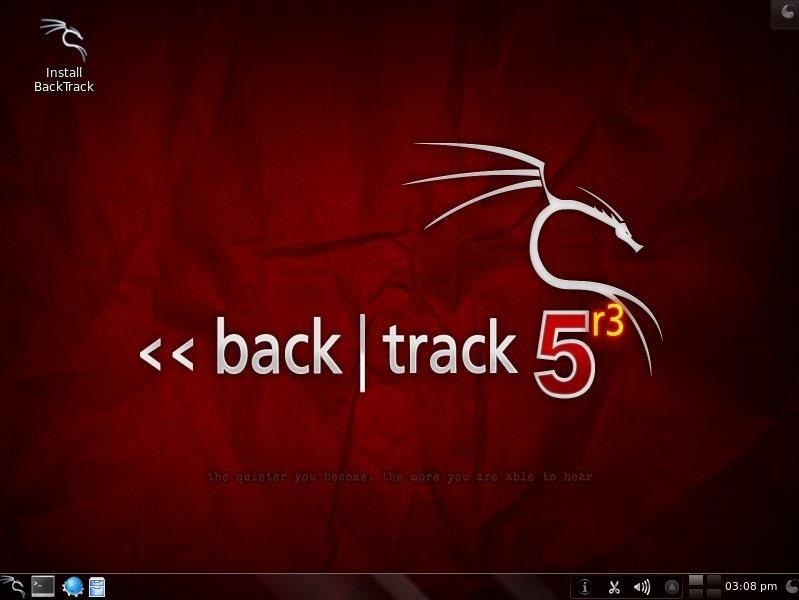
Step 1: Boot Up Linux

Once you've booted up BackTrack, logged in as "root" and then type:
  • bt > startx
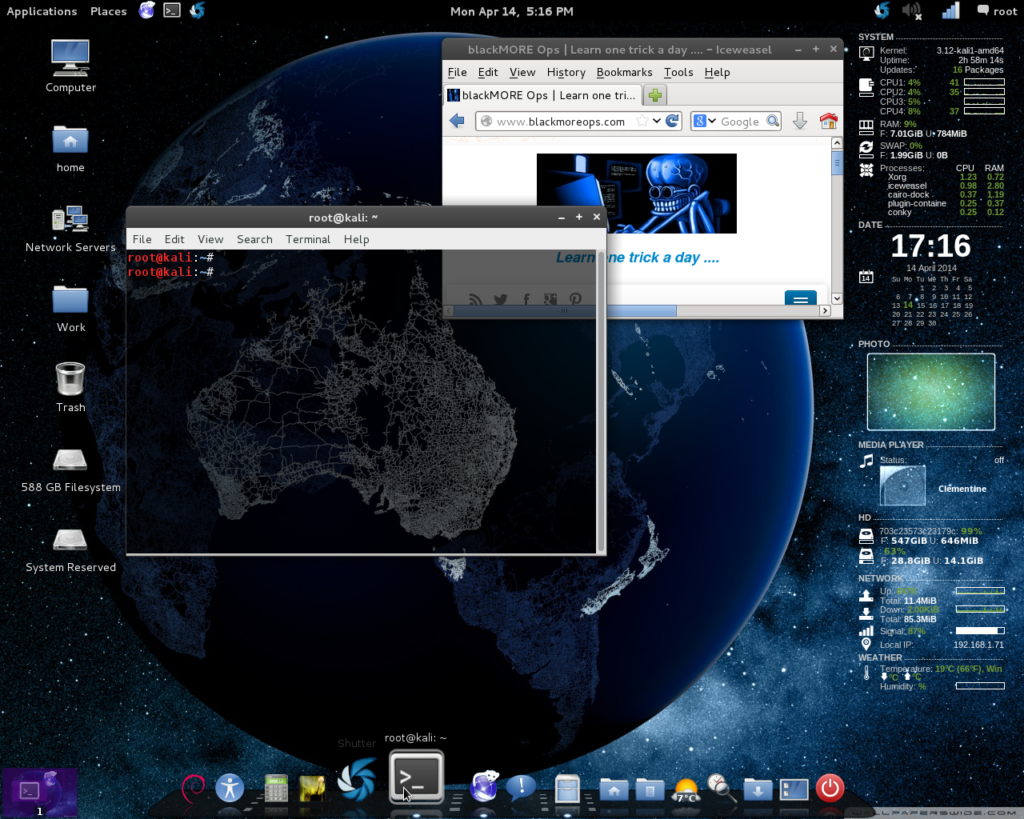
You should have a screen that looks similar to this.

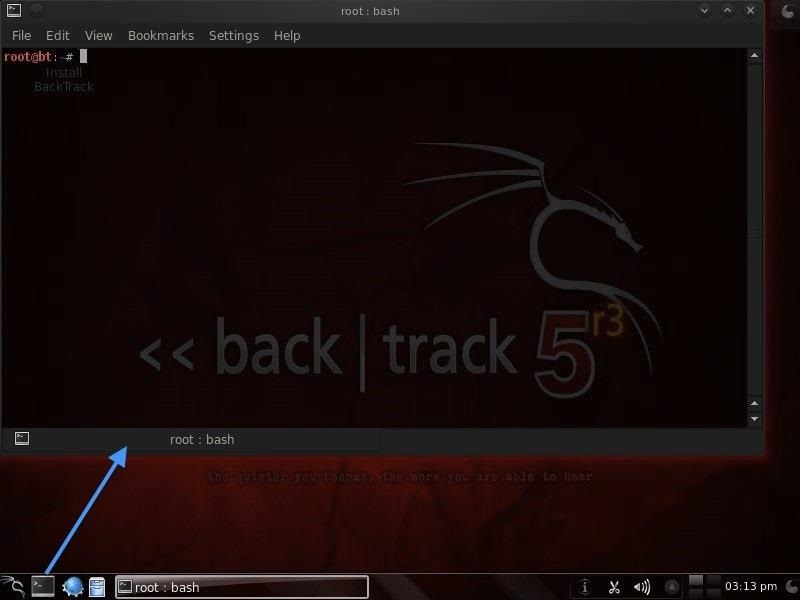
Step 2: Open a Terminal

To become proficient in Linux, you MUST master the terminal. Many things can be done now in the various Linux distributions by simply pointing and clicking, similar to Windows or Mac OS, but the expert hacker must know how to use the terminal to run most of the hacking tools.
So, let's open a terminal by clicking on the terminal icon on the bottom bar. That should give us a screen that looks similar to this.
If you've ever used the command prompt in Windows, the Linux terminal is similar, but far more powerful. Unlike the Windows command prompt, you can do EVERYTHING in Linux from the terminal and control it more precisely than in Windows.
It's important to keep in mind that unlike Windows, Linux is case-sensitive. This means that "Desktop" is different from "desktop" which is different from "DeskTop". Those who are new to Linux often find this challenging, so try to keep this in mind.

Step 3: Examine the Directory Structure

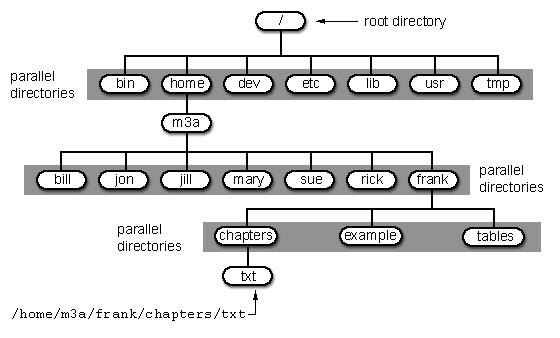
Let's start with some basic Linux. Many beginners get tripped up by the structure of the file system in Linux. Unlike Windows, Linux's file system is not linked to a physical drive like in Windows, so we don't have a c:\ at the beginning of our Linux file system, but rather a /.
The forward slash (/) represents the "root" of the file system or the very top of the file system. All other directories (folders) are beneath this directory just like folders and sub-folders are beneath the c:\ drive.
To visualize the file system, let's take a look at this diagram below.
It's important to have a basic understanding of this file structure because often we need to navigate through it from the terminal without the use of a graphical tool like Windows Explorer.
A couple key things to note in this graphical representation:
  • The /bin directory is where binaries are stored. These are the programs that make Linux run.
  • /etc is generally where the configuration files are stored. In Linux, nearly everything is configured with a text file that is stored under /etc.
  • /dev directory holds device files, similar to Windows device drivers.
  • /var is generally where log files, among other files, are stored.

Step 4: Using Pwd

When we open a terminal in BackTrack, the default directory we're in is our "home" directory. As you can see from the graphic above, it's to the right of the "root" directory or one level "below" root. We can confirm what directory we are in by typing:
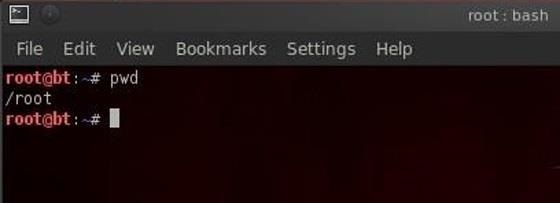
  • bt > pwd
pwd stands for "present working directory" and as you can see, it returns "/root" meaning we're in the root users directory (don't confuse this with the top of the directory tree "root." This is the root users directory).
pwd is a handy command to remember as we can use it any time to tell us where we are in the directory tree.

Step 5: Using Cd Command

We can change the directory we're working in by using the cd (change directory) command. In this case, let's navigate "up" to the top of the directory structure by typing:
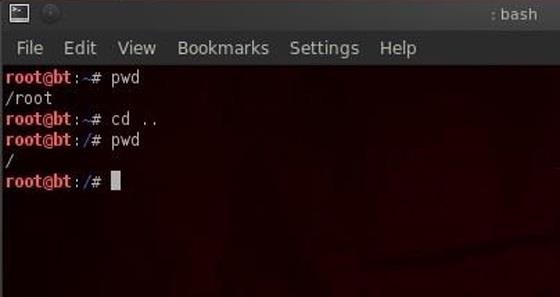
  • bt > cd ..
The cd command followed by the double dots (..) says, "move me up one level in the directory tree." Notice that our command prompt has changed and when we type pwd we see that Linux responds by telling us we are in the "/" or the top of the directory tree (or the root directory).
  • bt > pwd

Step 6: Using the Whoami Command

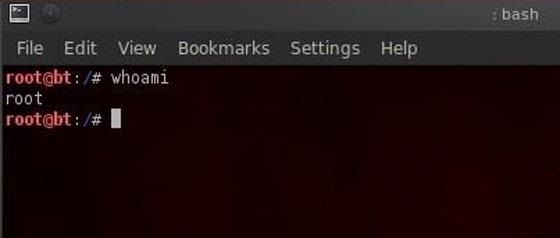
In our last lesson of this tutorial, we'll use the whoami command. This command will return the name of the user we're logged in as. Since we're the root user, we can log in to any user account and that user's name would be displayed here.
  • bt > whoami
That's it for now. In the next several tutorials, I will continue to give you the basics of Linux that you'll need to be a pro hacker, so keep coming back!

Source: null-byte.wonderhowto

Work with Terminal Linux


A number of you have written me regarding which operating system is best for hacking. I'll start by saying that nearly every professional and expert hacker uses Linux or Unix. Although some hacks can be done with Windows and Mac OS, nearly all of the hacking tools are developed specifically for Linux.


There are some exceptions, though, including software like Cain and Abel, Havij, Zenmap, and Metasploit that are developed or ported for Windows.
When these Linux apps are developed in Linux and then ported over to Windows, they often lose some of their capabilities. In addition, there are capabilities built into Linux that simply are not available in Windows. That is why hacker tools are in most cases ONLY developed for Linux.
To summarize, to be a real expert hacker, you should master a few Linux skills and work from a Linux distribution like BackTrack or Kali.
Image via wonderhowto.com
For those of you who've never used Linux, I dedicate the next few tutorials on the basics of Linux with an emphasis on the skills you need for hacking. So, let's open up BackTrack or your other Linux distribution and let me show you a few things.

Step 1: Boot Up Linux

Once you've booted up BackTrack, logged in as "root" and then type:
  • bt > startx
You should have a screen that looks similar to this.

Step 2: Open a Terminal

To become proficient in Linux, you MUST master the terminal. Many things can be done now in the various Linux distributions by simply pointing and clicking, similar to Windows or Mac OS, but the expert hacker must know how to use the terminal to run most of the hacking tools.
So, let's open a terminal by clicking on the terminal icon on the bottom bar. That should give us a screen that looks similar to this.
If you've ever used the command prompt in Windows, the Linux terminal is similar, but far more powerful. Unlike the Windows command prompt, you can do EVERYTHING in Linux from the terminal and control it more precisely than in Windows.
It's important to keep in mind that unlike Windows, Linux is case-sensitive. This means that "Desktop" is different from "desktop" which is different from "DeskTop". Those who are new to Linux often find this challenging, so try to keep this in mind.

Step 3: Examine the Directory Structure

Let's start with some basic Linux. Many beginners get tripped up by the structure of the file system in Linux. Unlike Windows, Linux's file system is not linked to a physical drive like in Windows, so we don't have a c:\ at the beginning of our Linux file system, but rather a /.
The forward slash (/) represents the "root" of the file system or the very top of the file system. All other directories (folders) are beneath this directory just like folders and sub-folders are beneath the c:\ drive.
To visualize the file system, let's take a look at this diagram below.
It's important to have a basic understanding of this file structure because often we need to navigate through it from the terminal without the use of a graphical tool like Windows Explorer.
A couple key things to note in this graphical representation:
  • The /bin directory is where binaries are stored. These are the programs that make Linux run.
  • /etc is generally where the configuration files are stored. In Linux, nearly everything is configured with a text file that is stored under /etc.
  • /dev directory holds device files, similar to Windows device drivers.
  • /var is generally where log files, among other files, are stored.

Step 4: Using Pwd

When we open a terminal in BackTrack, the default directory we're in is our "home" directory. As you can see from the graphic above, it's to the right of the "root" directory or one level "below" root. We can confirm what directory we are in by typing:
  • bt > pwd
pwd stands for "present working directory" and as you can see, it returns "/root" meaning we're in the root users directory (don't confuse this with the top of the directory tree "root." This is the root users directory).
pwd is a handy command to remember as we can use it any time to tell us where we are in the directory tree.

Step 5: Using Cd Command

We can change the directory we're working in by using the cd (change directory) command. In this case, let's navigate "up" to the top of the directory structure by typing:
  • bt > cd ..
The cd command followed by the double dots (..) says, "move me up one level in the directory tree." Notice that our command prompt has changed and when we type pwd we see that Linux responds by telling us we are in the "/" or the top of the directory tree (or the root directory).
  • bt > pwd

Step 6: Using the Whoami Command

In our last lesson of this tutorial, we'll use the whoami command. This command will return the name of the user we're logged in as. Since we're the root user, we can log in to any user account and that user's name would be displayed here.
  • bt > whoami
That's it for now. In the next several tutorials, I will continue to give you the basics of Linux that you'll need to be a pro hacker, so keep coming back!

Source: null-byte.wonderhowto


The new Kali-Linux (BT6) comes with many advance and increasing features and one of its incredible feature is its SMS spoofing weapon. So today we will have fun with this feature and see how easily we can spoof SMS. This is an amazing and improved feature that has made many security professionals think. Anyone can easily spoof sms from various numbers and there is no chance to be caught. This feature is located in the SET (
Social Engineering toolkit
). For this go to
Applications>>Kali Linux>>Exploitation tools>>se-toolkit
Next select option 7: SMS spoofing attacks
Then select the option no 1: Perform SMS spoofing attack
After that again select option no 1: SMS Attack single phone number
Now enter the victim’s Phone-number with its country code
Now select a template or use predefined templates as shown in below image
I am selecting a fake police SMS option 19
Now it’s almost done, from here you can choose the predefined android emulator or use your the SMS accounts. Thus, either you can start a war or stop it by sending SMS from fake locations.
Don't use these tricks in unethical way. Have fun!

Source:- hackerschronicle.com

SMS Spoofing with Kali Linux


The new Kali-Linux (BT6) comes with many advance and increasing features and one of its incredible feature is its SMS spoofing weapon. So today we will have fun with this feature and see how easily we can spoof SMS. This is an amazing and improved feature that has made many security professionals think. Anyone can easily spoof sms from various numbers and there is no chance to be caught. This feature is located in the SET (
Social Engineering toolkit
). For this go to
Applications>>Kali Linux>>Exploitation tools>>se-toolkit
Next select option 7: SMS spoofing attacks
Then select the option no 1: Perform SMS spoofing attack
After that again select option no 1: SMS Attack single phone number
Now enter the victim’s Phone-number with its country code
Now select a template or use predefined templates as shown in below image
I am selecting a fake police SMS option 19
Now it’s almost done, from here you can choose the predefined android emulator or use your the SMS accounts. Thus, either you can start a war or stop it by sending SMS from fake locations.
Don't use these tricks in unethical way. Have fun!

Source:- hackerschronicle.com